
In this article, we will be looking at loading data from Snowflake tables and using the data for the following tasks:Documentation Index
Fetch the complete documentation index at: https://handbook.fiddler.ai/llms.txt
Use this file to discover all available pages before exploring further.
- Onboarding a model to Fiddler
- Uploading baseline data to Fiddler
- Publishing production data to Fiddler
Import data from Snowflake
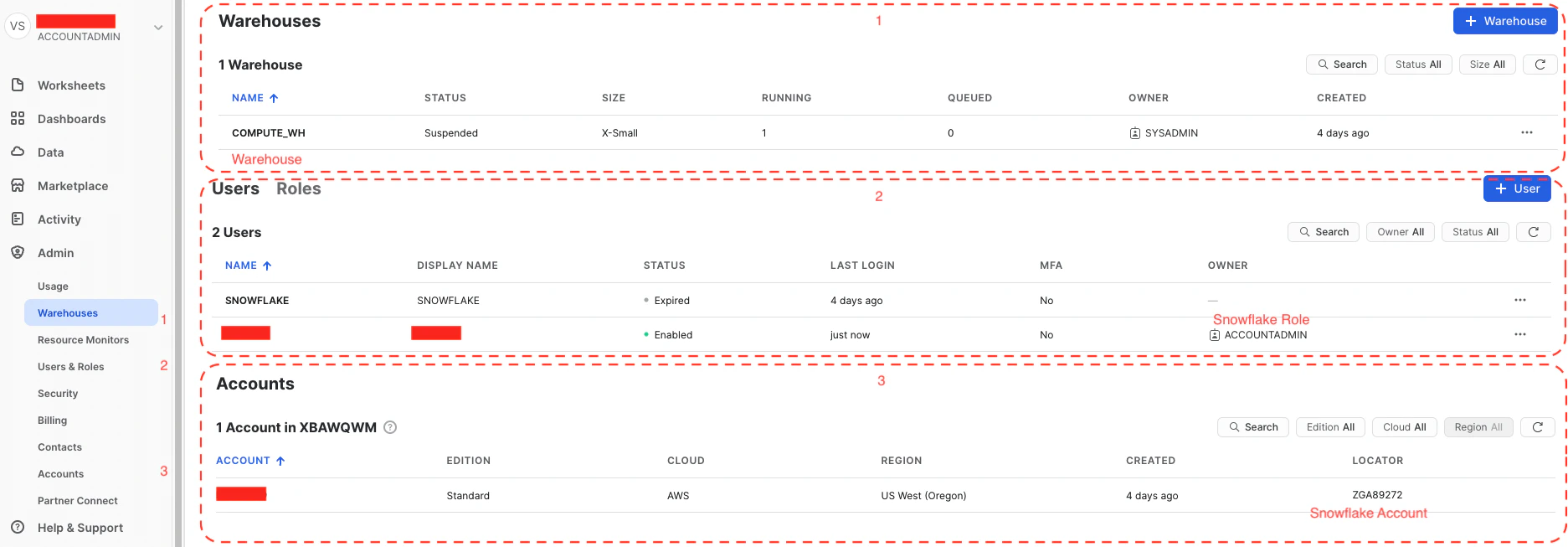
In order to import data from Snowflake to a Jupyter notebook, we will use the snowflake library which can be installed using the following command in your Python environment.- Snowflake Warehouse
- Snowflake Role
- Snowflake Account
- Snowflake User
- Snowflake Password
- Warehouse - select CURRENT_WAREHOUSE()
- Role - select CURRENT_ROLE()
- Account - select CURRENT_ACCOUNT()
Publish Production Events
Now that we have data imported from Snowflake to a dataframe, we can refer to the following pages to:- Onboard a model using the baseline dataset for the model schema inference sample.
- Upload a Baseline dataset, which is optional but recommended for monitoring comparisons.
- Publish production events for continuous monitoring.