
Building reliable LLM and agentic applications requires more than just deploying models; it requires systematic evaluation to ensure quality, safety, and consistent performance. Fiddler Experiments provides an evaluation framework that helps you test, measure, and improve your AI applications. Whether you’re comparing different prompts, testing model updates, or ensuring quality standards, Fiddler Experiments provides the tools to quantify and validate changes.Documentation Index
Fetch the complete documentation index at: https://handbook.fiddler.ai/llms.txt
Use this file to discover all available pages before exploring further.
First Time Setting Up?Before you can start running experiments, you need to create a project and application in Fiddler. See Onboard Your GenAI Application for step-by-step instructions.
What Is Fiddler Experiments?
Fiddler Experiments is an evaluation platform that helps you measure and improve the quality of your LLM applications. It provides built-in evaluators, custom evaluation support, and a comparison interface to:- Test systematically: Create comprehensive test suites with real-world scenarios
- Measure objectively: Use built-in and custom evaluators to assess quality
- Compare confidently: Analyze experiments side-by-side to make data-driven decisions
- Improve continuously: Track progress over time and identify areas for enhancement
Core Concepts
Understanding three key concepts will help you get the most from Fiddler Experiments: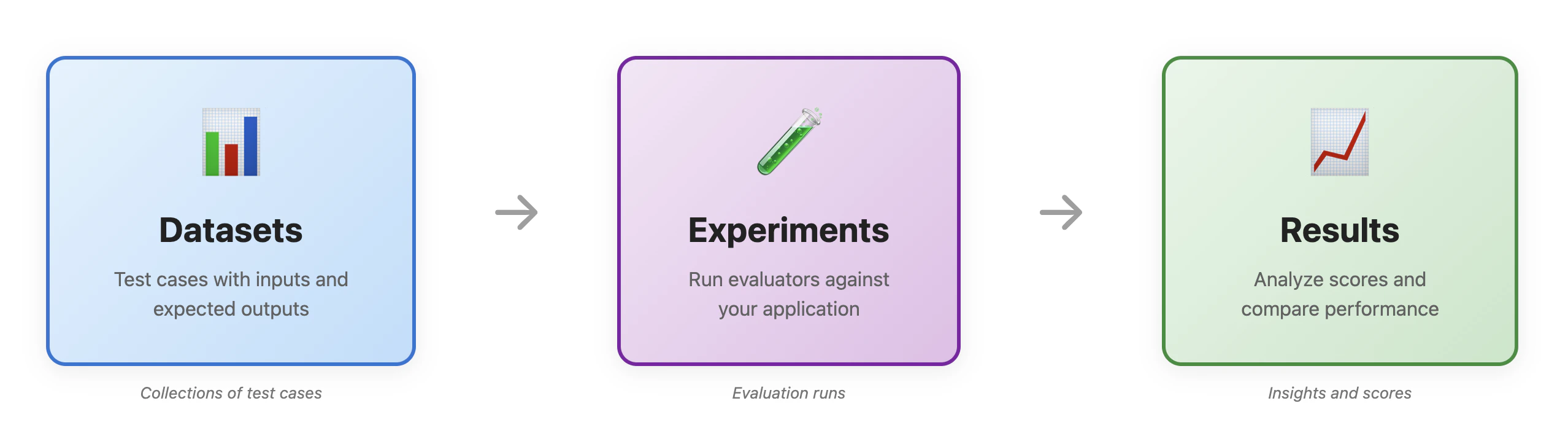
- Datasets: Collections of test cases with inputs and expected outputs
- Experiments: Test runs that evaluate your application against a dataset
- Evaluators: Metrics that assess specific aspects of your application’s performance
New to evaluation terminology? See our Experiments Glossary for definitions of key terms such as evaluator, metric, score, and experiment.
Powered by Fiddler Trust ServiceFiddler Experiments evaluators run on Fiddler Trust Models that operate entirely within your environment—no external API calls, zero hidden costs, and enterprise-grade security. Learn more about Trust Service.
Why Choose Fiddler Experiments?
Fiddler Experiments stands apart from fragmented evaluation tools by providing an integrated approach to AI quality assurance:Unified Development-to-Production Workflow
Unlike tools that separate pre-production testing from production monitoring, Fiddler Experiments integrates seamlessly with Fiddler Agentic Observability. This unified workflow means:- Consistent metrics: The same evaluators you use in development run in production monitoring
- Continuous learning: Production insights feed back into experiment datasets
- Seamless transition: Deploy with confidence knowing your production monitoring matches your testing
Cost-Effective with Trust Service
Powered by the Fiddler Trust Service, Fiddler Experiments evaluators run on purpose-built Trust Models:- Zero Hidden Costs: No external API calls, no per-request fees, no token charges
- High Performance: <100ms response times enable real-time evaluation
- Enterprise Security: Your data never leaves your environment—no third-party API exposure
- Superior Accuracy: 50% more accurate than generic models on LLM evaluation benchmarks
Enterprise-Grade Reliability
- Scalable: Evaluate thousands of test cases in parallel
- Collaborative: Team access controls and shared experiment libraries
- Auditable: Complete traceability for compliance and debugging
- Framework-Agnostic: Works with any LLM provider or agentic framework
Why Systematic Evaluation Matters
LLM and agentic applications face unique quality challenges that make systematic evaluation essential:The Challenge of Variability
LLMs and agentic applications are non-deterministic, meaning they can produce different outputs for the same input, making quality assessment difficult. Without systematic evaluation:- You can’t reliably detect quality degradation
- Improvements are based on anecdotal evidence rather than data
- Edge cases and failure modes go unnoticed until production
The Need for Objectivity
Human evaluation is valuable but subjective and doesn’t scale. Automated evaluators provide:- Consistent, repeatable measurements
- Scalable evaluation across thousands of test cases
- Objective metrics for decision-making
The Power of Comparison
Understanding relative performance is crucial for improvement. Side-by-side comparison helps you:- Validate that changes actually improve performance
- Choose between different approaches with confidence
- Track progress toward quality goals
Navigating the Fiddler Experiments Interface
The Fiddler Experiments interface provides search, filtering, and side-by-side comparison of experiments. Let’s explore the key areas you’ll use.Experiments Dashboard
The main dashboard provides an overview of all your experiments, making it easy to track progress and identify trends.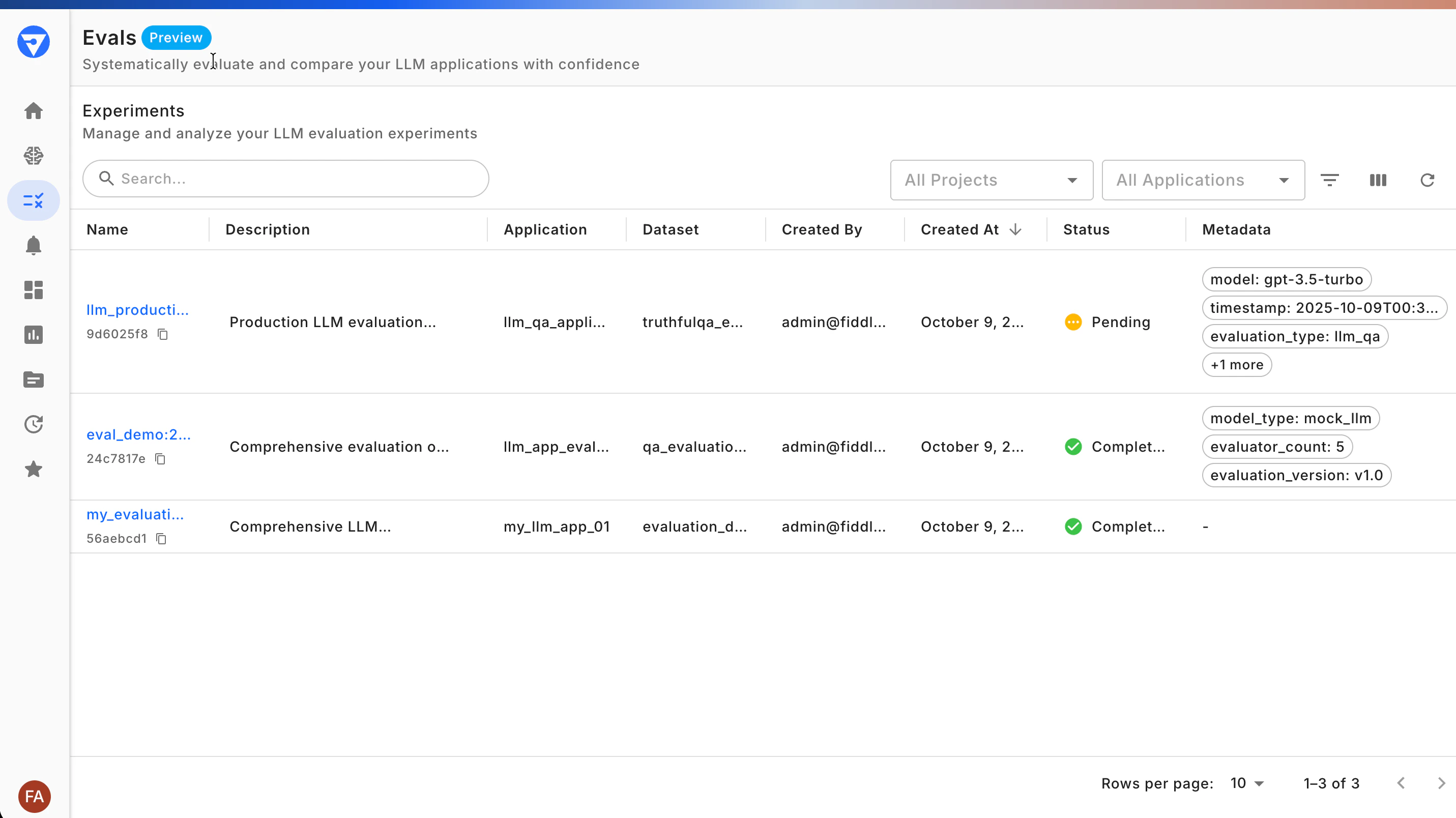
- Search and filter: Quickly find experiments by name, application, or dataset
- Status indicators: See which experiments are completed, in progress, or failed
- Metadata display: View custom metadata to understand experiment context
- Quick actions: Access experiment details or start comparisons directly
Viewing Experiment Details
Click on any experiment to explore the results in depth and understand your application’s performance.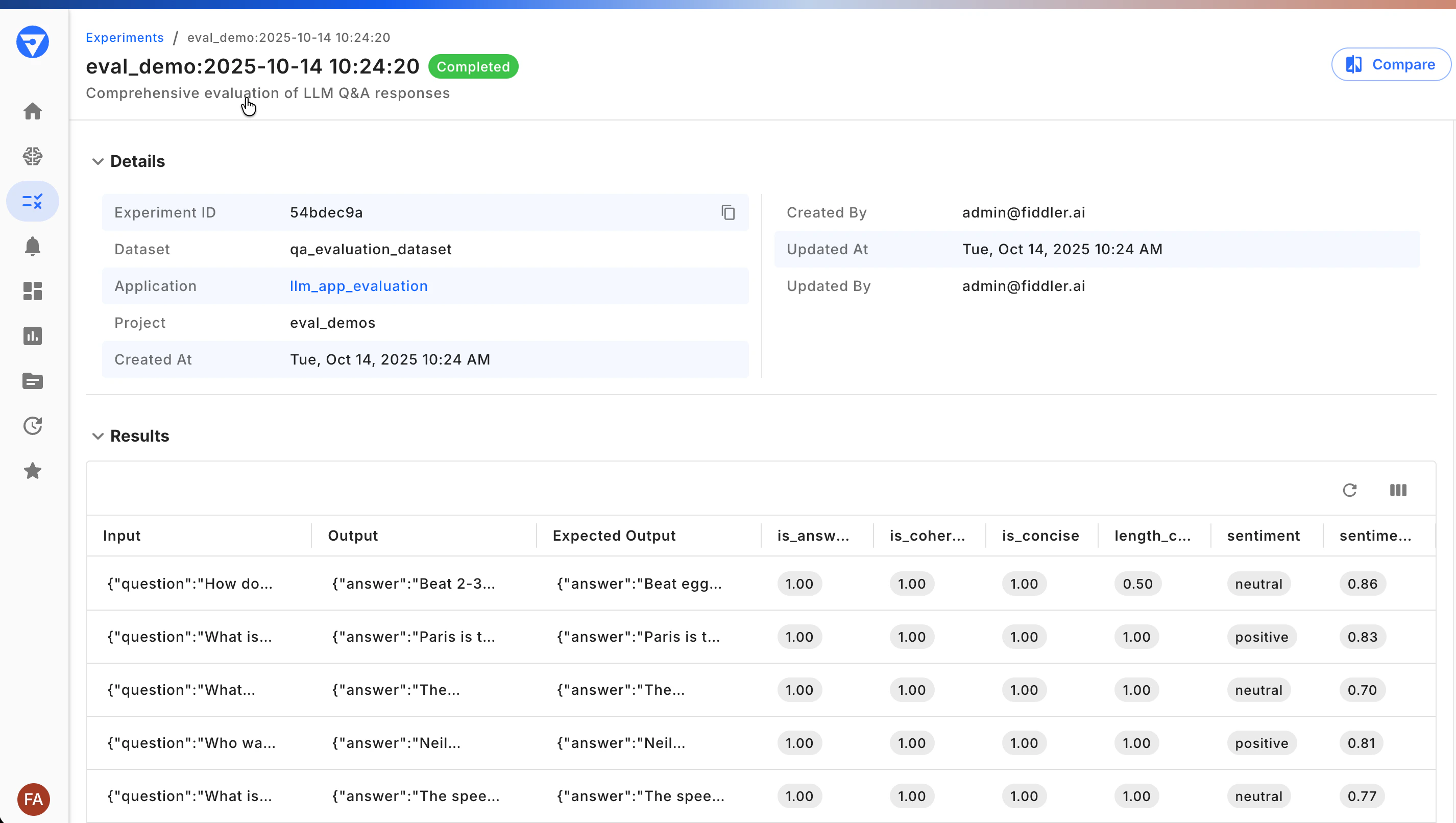
- Test case results: See inputs, outputs, and expected outputs for each item
- Evaluator scores: View all metrics calculated for each test case
- Experiment metadata: View details and labels that describe the experiment
Comparing Experiments
The comparison view shows performance differences between experiments, helping you validate whether changes improve your application.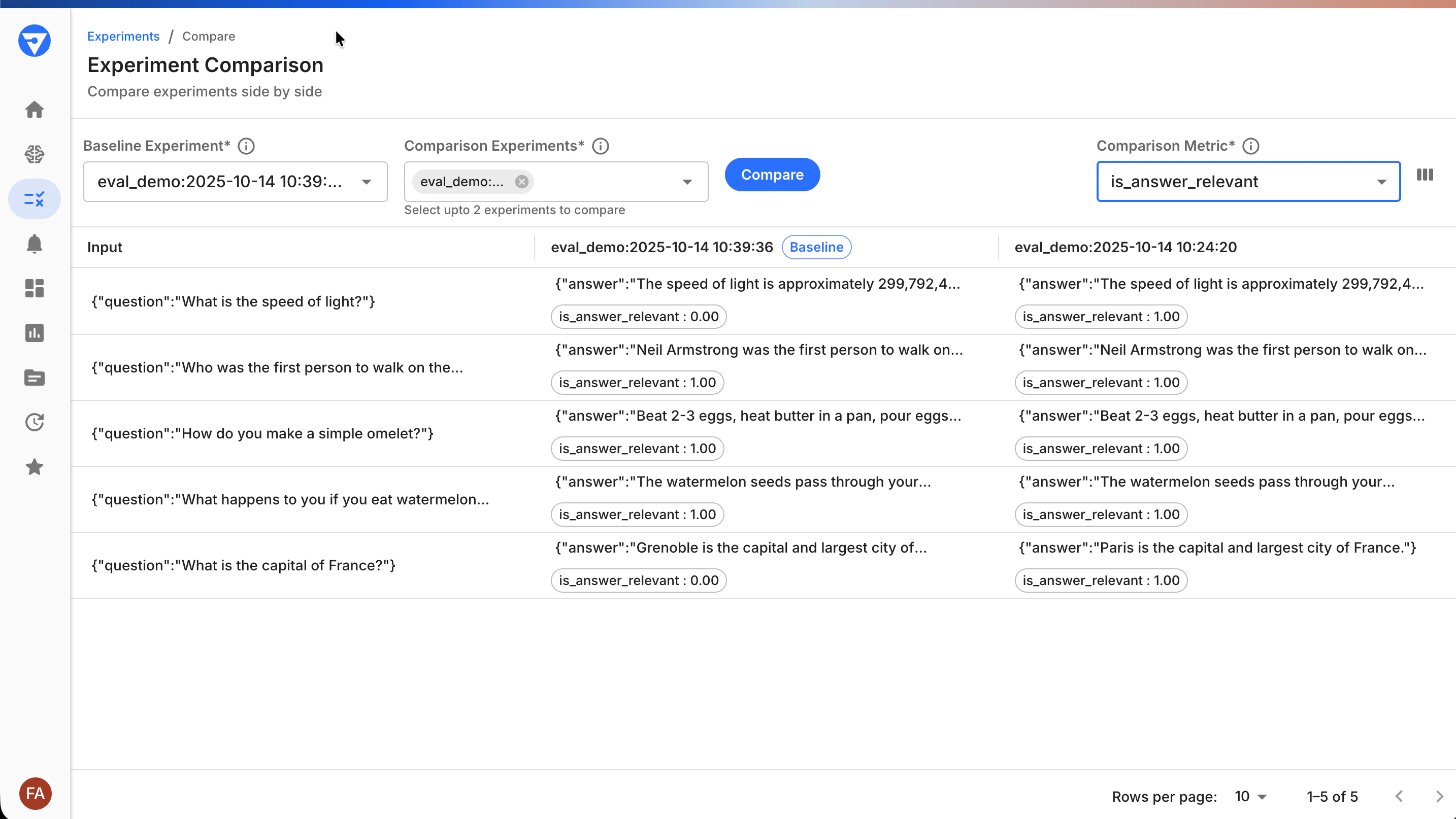
- Side-by-side metrics: See how each experiment performs on the same test cases
- Flexible metric selection: Choose which evaluators to compare
Core Workflow
The typical Fiddler Experiments workflow follows a simple pattern that scales from quick tests to comprehensive experiment suites:TL;DR: Create a dataset with test cases → Configure evaluators → Run experiment → Analyze results. Takes ~15 minutes for the first experiment.
The following walk-through is a high-level overview of a basic experiment workflow. For a fully functional example, refer to our Quick Start Guide and Notebook.
Create Your Dataset
Refer to the Evals SDK Technical Reference for instructions on installing and initializing the
fiddler-evals-sdk Python package.Configure Your Evaluators
Choose evaluators that measure what matters for your use case:
Evaluating a RAG application? Use the RAG Health Metrics evaluators (
AnswerRelevance, ContextRelevance, RAGFaithfulness) to diagnose retrieval vs. generation issues.Run Your Experiment
Evaluation Pattern: Fiddler’s built-in evaluators use the LLM-as-a-Judge pattern, where language models assess quality dimensions that are difficult to measure with rule-based systems. This provides automated quality assessment that approximates human evaluation patterns while maintaining consistency across thousands of test cases.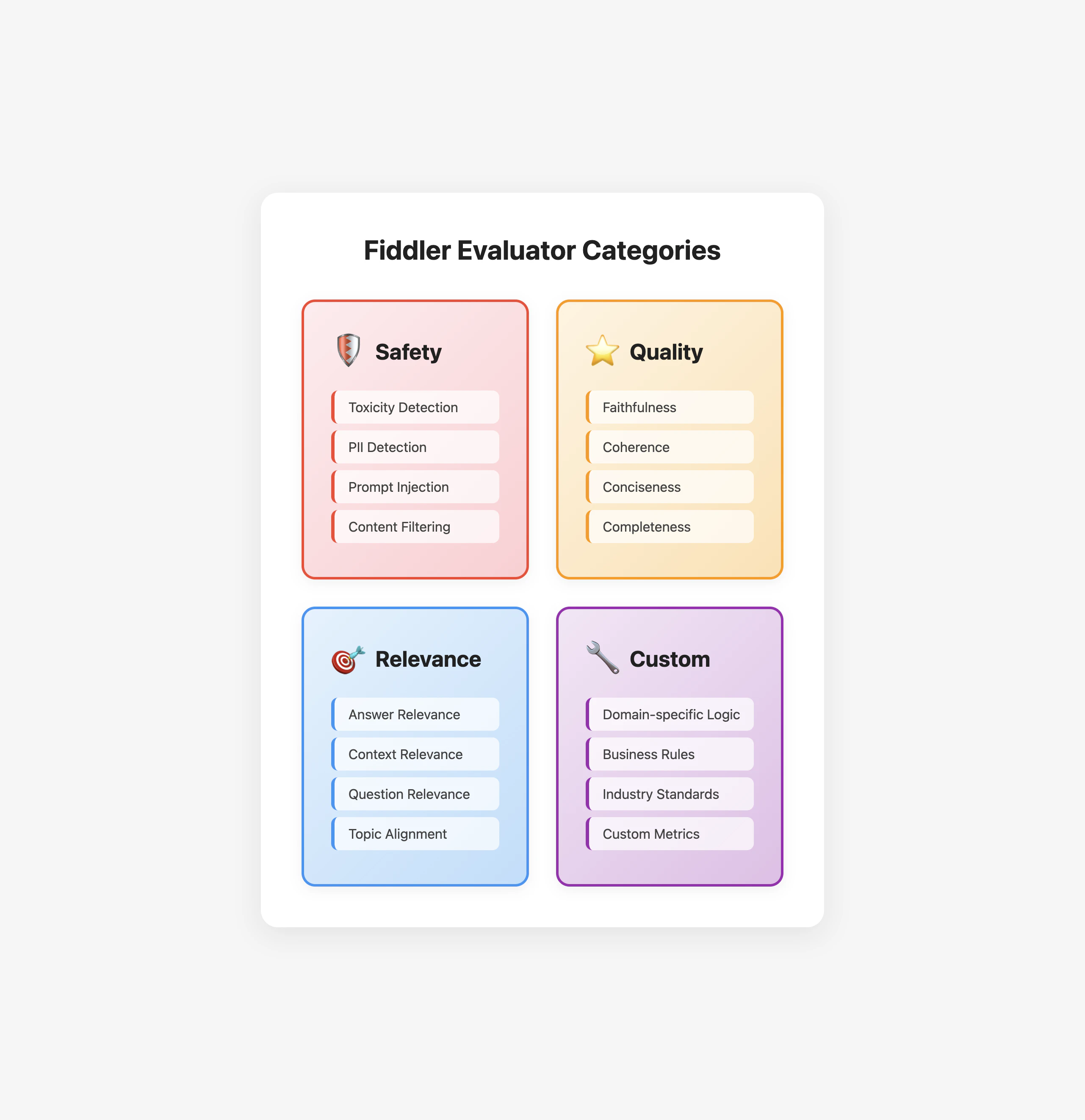
Understanding Your Experiment Results
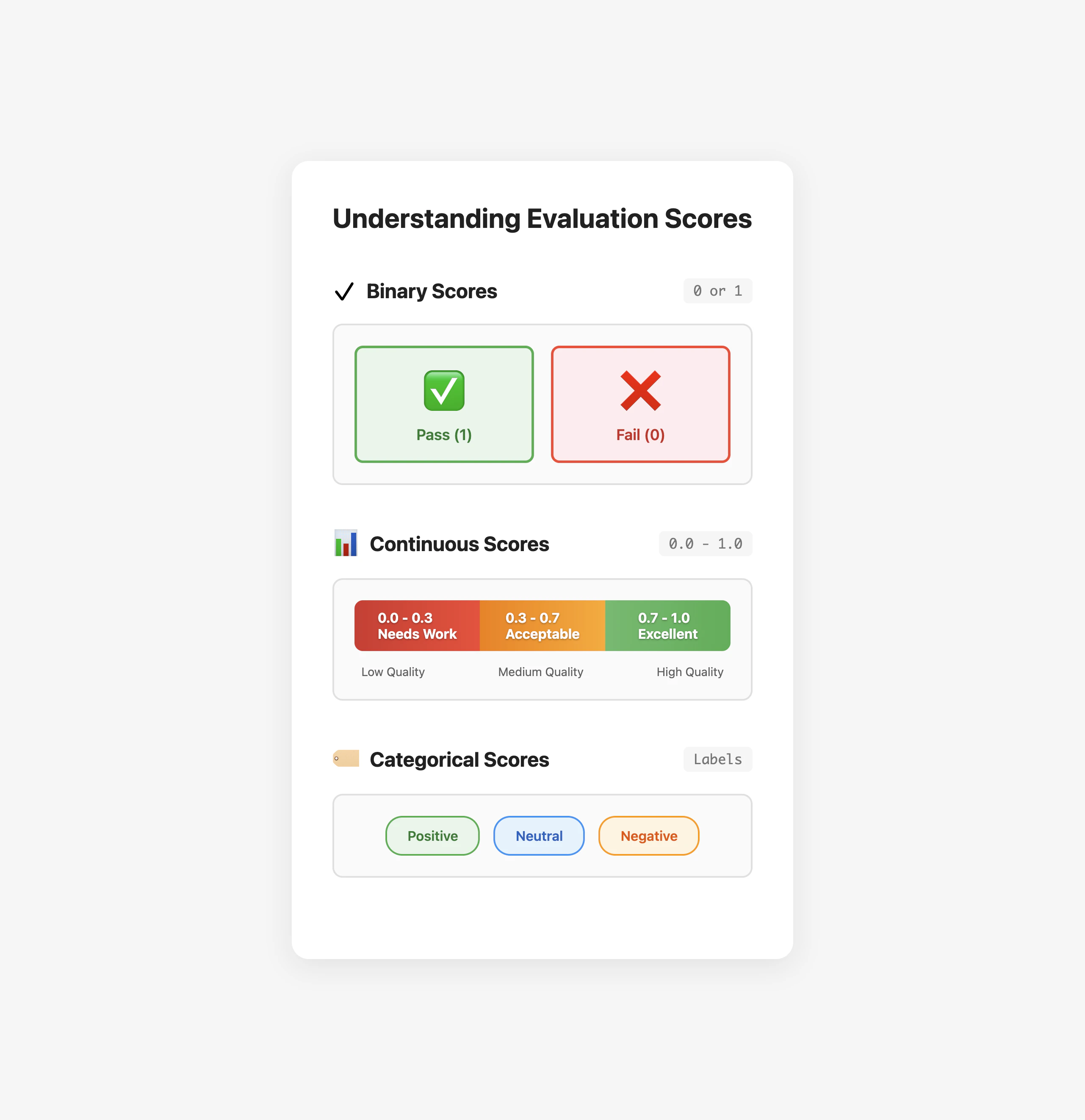
Interpreting experiment results effectively helps you make informed decisions about your application.Reading Score Cards
Each evaluator produces scores that help you understand specific aspects of performance:- Binary scores (0 or 1): Pass/fail metrics like relevance or correctness
- Continuous scores (0.0 to 1.0): Gradual metrics like similarity or confidence
- Categorical scores: Classifications like sentiment (positive/neutral/negative)
Identifying Patterns
Look for patterns across your test cases:- Consistent failures: Indicate systemic issues that need addressing
- Category-specific problems: Suggest areas needing specialized handling
- Score correlations: Reveal trade-offs between different metrics
Making Improvements
Use experiment insights to guide your optimization efforts:- Focus on the lowest scores: Address the most significant quality issues first
- Test hypotheses: Use experiments to validate that changes improve metrics
- Monitor trade-offs: Ensure improvements don’t degrade other aspects
Common Use Cases
Fiddler Experiments supports various experiment scenarios across the LLM application lifecycle:A/B Testing Prompts
Compare different prompt strategies to find what works best:Model Version Comparison
Validate that model updates improve performance:- Test the same dataset against different model versions
- Compare quality metrics side-by-side
- Ensure no regression in critical capabilities
Regression Testing
Protect against quality degradation as you develop:- Run standard test suites before deployments
- Set quality thresholds that must be met
- Track performance trends over time
Safety Validation
Ensure your application meets safety standards:- Test with adversarial inputs
- Measure toxicity and bias metrics
- Validate content filtering effectiveness
RAG System Evaluation
Evaluate Retrieval-Augmented Generation pipelines using the RAG Health Metrics evaluators — a purpose-built diagnostic framework that pinpoints whether issues originate in retrieval, generation, or query understanding:| What the metrics tell you | Why it’s happening | Next Step |
|---|---|---|
| High relevance + Low faithfulness | Hallucinations despite being on-topic | Check if retrieval provided sufficient grounding |
| High faithfulness + Low relevance | Grounded but didn’t answer the query | Check if retrieval provided relevant information |
| Low Context Relevance | Retrieval pulling wrong documents | Fix retrieval mechanism |
RAG Health Metrics works alongside Fiddler’s existing 80+ LLM metrics (toxicity, PII, coherence, and more) — providing targeted RAG diagnostics that complement your existing evaluation stack.
Agentic Application Evaluation
Evaluate AI agents and multi-step workflows with specialized patterns:- Trajectory Evaluation: Assess agent decision-making sequences and tool selection paths
- Reasoning Coherence: Validate logical flow from planning through execution
- Tool Usage Quality: Measure appropriateness and effectiveness of tool calls
- Multi-Agent Coordination: Track information flow and task delegation patterns
Best Practices
Follow these practices to get the most value from Fiddler Experiments:Building Representative Datasets
Create test sets that reflect real-world usage:- Include edge cases: Don’t just test the happy path—use dataset metadata to tag edge cases for focused analysis
- Balance categories: Ensure coverage across different scenarios, then use experiment comparison to validate your test distribution matches production patterns
- Use production data: Incorporate actual user inputs when possible (anonymized and sanitized)
- Update regularly: Keep test cases current with evolving requirements—track dataset versions in metadata
Choosing Appropriate Evaluators
Select metrics that align with your goals:- Start with basics: Answer relevance and safety evaluators (toxicity, PII) are essential for most applications
- Add domain-specific metrics: Build custom evaluators for specialized needs
- Avoid metric overload: Focus on 3-5 key metrics that actually drive decisions rather than tracking everything
- Validate with humans: Spot-check evaluator scores against human judgment to ensure they align with your quality standards
Setting Up Experiment Cycles
Make experiments a routine part of development:- Pre-deployment testing: Always evaluate before production changes
- Regular benchmarking: Schedule periodic comprehensive experiments
- Continuous monitoring: Track key metrics in production
- Iterative improvement: Use insights to guide development priorities
Getting Started Checklist
Ready to start evaluating? Follow this simple checklist:- Set up your environment: Install the Fiddler Evals SDK
- Create your first dataset: Start with 10-20 representative test cases
- Run a baseline experiment: Establish current performance levels
- Review results in the UI: Understand your application’s strengths and weaknesses
- Improve and compare: Validate that changes have a positive impact
Troubleshooting Common Issues
Experiments Not Appearing
If your experiments don’t show in the dashboard:- Verify the experiment was completed successfully
- Check that you’re viewing the correct project/application
- Refresh the page to load the latest data
Unexpected Scores
If experiment scores seem incorrect:- Review the evaluator documentation to understand scoring logic
- Check that inputs/outputs are formatted correctly
- Validate that the correct evaluator parameters are used
Comparison Not Working
If you can’t compare experiments:- Ensure both experiments use the same dataset
- At least one metric/evaluator should be in common to compare the experiments
- Verify experiments have completed successfully
- Check that you have permissions to view both experiments
Next Steps
From Experiments to Production: The Complete Lifecycle
Fiddler Experiments is your Test phase in Fiddler’s complete end-to-end agentic AI lifecycle: 1. Build → Design and instrument your LLM applications and agents 2. Test → Evaluate systematically with Fiddler Experiments (you are here) 3. Monitor → Track production performance with Agentic Monitoring 4. Improve → Use insights to enhance quality and refine your agents This unified approach ensures your evaluation criteria in development become your monitoring standards in production—no fragmentation, no tool switching.Choose your path based on your role and goals: For Developers 🔧
- Evals SDK Quick Start - Hands-on tutorial with code
- Evals SDK Advanced Guide - Production-ready configurations
- Fiddler Evals SDK - Complete technical docs
- Agentic Monitoring - Monitor agents in production
- LLM Monitoring - Production observability
- Review sample dashboards in your Fiddler instance
- Schedule a workshop with your Fiddler team
- Explore case studies and best practices on the Fiddler blog
Summary
Fiddler Experiments adds systematic measurement to LLM application development, replacing ad-hoc testing with quantified assessment. By evaluating your applications, you can:- Compare experiments quantitatively: Use side-by-side metrics to validate that changes improve performance
- Track experiment trends: Monitor quality over time through the experiments dashboard
- Establish quality baselines: Define acceptable score thresholds for your use case
- Reuse test suites: Ensure consistency by testing model versions against the same datasets