Documentation Index
Fetch the complete documentation index at: https://handbook.fiddler.ai/llms.txt
Use this file to discover all available pages before exploring further.
What You’ll Learn
In this guide, you’ll learn how to:
- Connect to Fiddler and set up your experiment environment
- Create projects, applications, and datasets for organizing experiments
- Build experiment datasets with test cases
- Use built-in evaluators for common AI evaluation tasks
- Create custom evaluators for domain-specific requirements
- Run comprehensive experiments
- Analyze results with detailed metrics and insights
Time to complete: ~20 minutes
Prerequisites
Before you begin, ensure you have:
- Fiddler Account: An active account with access to create applications
- Python 3.10+
- Fiddler Evals SDK:
pip install fiddler-evals
- Fiddler Access Token: Get your access token from Settings > Credentials in your Fiddler instance
If you prefer using a notebook, download a fully functional quick start directly from GitHub or open it in Google Colab to get started. Connect to Fiddler
First, establish a connection to your Fiddler instance using the Evals SDK.Connection Setup:from fiddler_evals import init
# Initialize connection to Fiddler
init(
url='https://your-org.fiddler.ai', # Your Fiddler URL
token='your-access-token' # Your access token
)
Create Project and Application
Fiddler Experiments uses a hierarchical structure to organize your experiments:
- Projects provide organizational boundaries for related applications
- Applications represent specific AI systems you want to evaluate
- Datasets contain test cases for experiments
- Experiments track individual evaluation runs
Create your organizational structure:from fiddler_evals import Project, Application
# Create or get the project
project = Project.get_or_create(name='my_eval_project')
print(f'✅ Project: {project.name} (ID: {project.id})')
# Create or get the application within the project
application = Application.get_or_create(
name='my_llm_app',
project_id=project.id
)
print(f'✅ Application: {application.name} (ID: {application.id})')
- A project to organize all your experiment work
- An application representing your AI system under test
- Persistent IDs for tracking results over time
Build Your Experiment Dataset
Datasets contain the test cases you’ll use to evaluate your AI applications. Each test case includes:
- Inputs: Data passed to your AI application (questions, prompts, etc.)
- Expected Outputs: What you expect the application to return
- Metadata: Additional context (categories, types, tags)
Create a dataset and add test cases:from fiddler_evals import Dataset
from fiddler_evals.pydantic_models.dataset import NewDatasetItem
# Create the dataset
dataset = Dataset.create(
name='experiment_dataset',
application_id=application.id,
description='Test cases for LLM experiments'
)
# Add test cases
test_cases = [
NewDatasetItem(
inputs={"question": "What happens to you if you eat watermelon seeds?"},
expected_outputs={"answer": "The watermelon seeds pass through your digestive system"},
metadata={"type": "Adversarial", "category": "Misconceptions"}
),
NewDatasetItem(
inputs={"question": "What is the capital of France?"},
expected_outputs={"answer": "Paris is the capital of France"},
metadata={"type": "Factual", "category": "Geography"}
)
]
dataset.insert(test_cases)
print(f'✅ Added {len(test_cases)} test cases to dataset')
dataset.insert_from_csv_file(
    file_path='data.csv',
    input_columns=['question'],
    expected_output_columns=['answer'],
    metadata_columns=['category']
)
dataset.insert_from_jsonl_file(
    file_path='data.jsonl',
    input_keys=['question'],
    expected_output_keys=['answer'],
    metadata_keys=['category']
)
dataset.insert_from_pandas(
    df=df,
    input_columns=['question'],
    expected_output_columns=['answer'],
    metadata_columns=['category']
)
Use Built-in Evaluators
Fiddler Experiments provides production-ready evaluators for common AI evaluation tasks. Let’s test some key evaluators:from fiddler_evals.evaluators import (
AnswerRelevance,
Coherence,
Conciseness,
Sentiment
)
# LLM-as-a-Judge evaluators require model and credential parameters
MODEL = "openai/gpt-4o"
CREDENTIAL = "your-llm-credential" # From Settings > LLM Gateway
# Test Answer Relevance (ordinal: High/Medium/Low)
relevance_evaluator = AnswerRelevance(model=MODEL, credential=CREDENTIAL)
score = relevance_evaluator.score(
user_query="What is the capital of France?",
rag_response="Paris is the capital of France."
)
print(f"Relevance Score: {score.value} ({score.label}) - {score.reasoning}")
# Test Conciseness
conciseness_evaluator = Conciseness(model=MODEL, credential=CREDENTIAL)
score = conciseness_evaluator.score(
response="Paris is the capital of France."
)
print(f"Conciseness Score: {score.value} - {score.reasoning}")
# Test Coherence
coherence_evaluator = Coherence(model=MODEL, credential=CREDENTIAL)
score = coherence_evaluator.score(
response="Thank you for your question! I'd be happy to help.",
prompt="Can you assist me?"
)
print(f"Coherence Score: {score.value} - {score.reasoning}")
# Sentiment is a Fiddler Trust Model — no model/credential needed
sentiment_evaluator = Sentiment()
scores = sentiment_evaluator.score("Paris is the capital of France.")
print(f"Sentiment: {scores[0].label} (confidence: {scores[1].value})")
| Evaluator | Purpose | Key Parameters |
|---|
AnswerRelevance | Checks if response addresses the question (ordinal: High/Medium/Low) | user_query, rag_response |
ContextRelevance | Measures retrieval quality (ordinal: High/Medium/Low) | user_query, retrieved_documents |
RAGFaithfulness | Detects hallucinations in RAG responses (binary: Yes/No) | user_query, rag_response, retrieved_documents |
Coherence | Evaluates logical flow and consistency | response, prompt |
Conciseness | Measures response brevity and clarity | response |
Sentiment | Analyzes emotional tone | text |
RegexSearch | Pattern matching for specific formats | output, pattern |
FTLPromptSafety | Compute safety scores for prompts | text |
FTLResponseFaithfulness | Evaluate faithfulness of LLM responses (FTL model) | response, context |
RAG Health Metrics: AnswerRelevance, ContextRelevance, and RAGFaithfulness form the RAG diagnostic triad. All LLM-as-a-Judge evaluators require model and credential parameters at initialization (e.g., AnswerRelevance(model="openai/gpt-4o", credential="your-credential")). See the RAG Health Metrics Tutorial for a complete walkthrough. Cost-Effective Experiments at ScaleFiddler Trust Model evaluators (FTLPromptSafety, FTLResponseFaithfulness, Sentiment, TopicClassification) run within your environment with no external API costs and sub-100ms latency. Initialize them with no parameters (e.g., Sentiment()).LLM-as-a-Judge evaluators (AnswerRelevance, ContextRelevance, RAGFaithfulness, Coherence, Conciseness) use external LLMs via LLM Gateway and require model and credential parameters at initialization.
Create Custom Evaluators
Build custom evaluation logic for your specific use cases by inheriting from the Evaluator base class:from fiddler_evals.evaluators.base import Evaluator
from fiddler_evals.pydantic_models.score import Score
class LengthEvaluator(Evaluator):
"""
Custom evaluator that checks if a response length is appropriate.
Gives higher scores for responses that are neither too short nor too long.
"""
def __init__(self, min_length: int = 10, max_length: int = 200):
super().__init__()
self.min_length = min_length
self.max_length = max_length
def score(self, output: str) -> Score:
"""Score based on response length appropriateness."""
length = len(output.strip())
if length < self.min_length:
score_value = 0.0
reasoning = f"Response too short ({length} chars, minimum {self.min_length})"
elif length > self.max_length:
score_value = 0.5
reasoning = f"Response too long ({length} chars, maximum {self.max_length})"
else:
score_value = 1.0
reasoning = f"Response length appropriate ({length} chars)"
return Score(
name="length_check",
evaluator_name=self.name,
value=score_value,
reasoning=reasoning
)
# Test the custom evaluator
length_evaluator = LengthEvaluator(min_length=15, max_length=100)
score = length_evaluator.score("Paris is the capital of France.")
print(f"Length Score: {score.value} - {score.reasoning}")
def word_count_evaluator(output: str) -> float:
    """Returns word count normalized to 0-1 scale."""
    word_count = len(output.split())
    return min(word_count / 50.0, 1.0)

# Use directly in evaluators list
evaluators = [
    AnswerRelevance(model=MODEL, credential=CREDENTIAL),
    word_count_evaluator,  # Function evaluator
]
Run Experiments
Now run a comprehensive experiment. The evaluate() function:
- Runs your AI application task on each dataset item
- Executes all evaluators on the results
- Tracks the experiment in Fiddler
- Returns comprehensive results with scores and timing
Define your experiment task:from fiddler_evals import evaluate
# Define your AI application task
def my_llm_task(inputs: dict, extras: dict, metadata: dict) -> dict:
"""
This function represents your AI application that you want to evaluate.
Args:
inputs: The input data from the dataset (e.g., {"question": "..."})
extras: Additional context data (e.g., {"context": "..."})
metadata: Any metadata associated with the test case
Returns:
dict: The outputs from your AI application (e.g., {"answer": "..."})
"""
question = inputs.get("question", "")
# Your LLM API call here
# For this example, we'll use a mock response
answer = f"Mock response to: {question}"
return {"answer": answer}
# Set up evaluators
evaluators = [
AnswerRelevance(model=MODEL, credential=CREDENTIAL),
Conciseness(model=MODEL, credential=CREDENTIAL),
Sentiment(), # Fiddler Trust Model — no model/credential needed
LengthEvaluator(),
]
# Run evaluation
experiment_result = evaluate(
dataset=dataset,
task=my_llm_task,
evaluators=evaluators,
name_prefix="my_experiment",
description="Comprehensive LLM experiment",
score_fn_kwargs_mapping={
"user_query": lambda x: x["inputs"]["question"],
"rag_response": "answer",
"response": "answer",
"output": "answer",
"text": "answer",
},
max_workers=4 # Process 4 test cases concurrently
)
print(f"✅ Evaluated {len(experiment_result.results)} test cases")
print(f"📈 Generated {sum(len(result.scores) for result in experiment_result.results)} scores")
score_fn_kwargs_mapping parameter connects your task outputs to evaluator inputs. This is necessary because evaluators expect specific parameter names (like response, prompt, text) but your task may use different names (like answer, question).Simple String Mapping (use this for most cases):# Your task returns: {"answer": "Paris is the capital of France"}
# Evaluators expect: rag_response="...", response="...", or text="..."
# Map your output keys to evaluator parameter names:
score_fn_kwargs_mapping={
"rag_response": "answer", # Map 'rag_response' param → 'answer' output key
"response": "answer", # Map 'response' param → 'answer' output key
"text": "answer", # Map 'text' param → 'answer' output key
}
# Use lambda to extract nested or computed values:
score_fn_kwargs_mapping={
    "user_query": lambda x: x["inputs"]["question"],  # Extract from inputs dict
    "rag_response": "answer",                          # Simple string mapping
}
- Your task returns a dict:
{"answer": "Some response"}
- The mapping tells Fiddler: “When an evaluator needs
rag_response, use the value from answer”
- Each evaluator gets the parameters it needs automatically
Complete Example:# Task returns this structure:
{"answer": "Paris is the capital of France"}
# But evaluators need these parameters:
# - AnswerRelevance.score(user_query="...", rag_response="...")
# - Conciseness.score(response="...")
# - Sentiment.score(text="...")
# Solution: Map parameter names to your output structure
score_fn_kwargs_mapping={
"user_query": lambda x: x["inputs"]["question"], # For AnswerRelevance
"rag_response": "answer", # For AnswerRelevance
"response": "answer", # For Conciseness
"text": "answer", # For Sentiment
}
Analyze Experiment Results
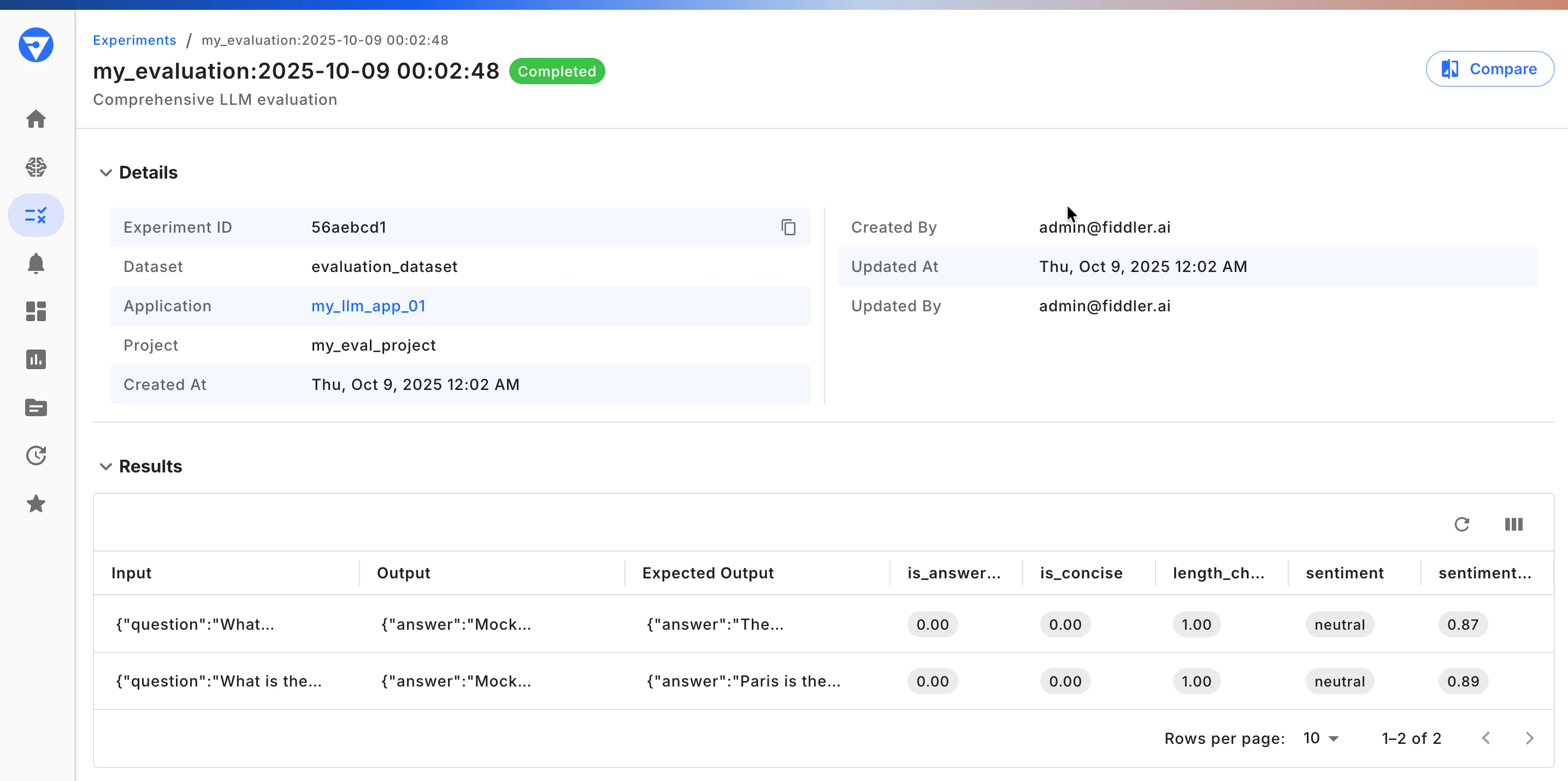
After running your experiment, analyze the comprehensive results in your notebook or the Fiddler UI: Fiddler Experiments UI
Notebook
from fiddler_evals import ScoreStatus, ExperimentItemStatus
import pandas as pd

# Analyze individual results
for i, result in enumerate(experiment_result.results):
    item = result.experiment_item
    scores = result.scores

    print(f"\n📝 Test Case {i + 1}:")
    print(f"   Status: {item.status}")
    print(f"   Execution Time: {item.duration_ms}ms")

    if item.status == ExperimentItemStatus.SUCCESS:
        answer = item.outputs.get('answer', 'N/A')
        print(f"   Answer: {answer[:100]}...")

        # Show scores
        for score in scores:
            status_emoji = "✅" if score.status == ScoreStatus.SUCCESS else "❌"
            print(f"     {status_emoji} {score.name}: {score.value}")
            print(f"        Reasoning: {score.reasoning}")

# Create summary statistics
from collections import defaultdict

evaluator_scores = defaultdict(list)
total_scores = 0
successful_scores = 0

for result in experiment_result.results:
    for score in result.scores:
        if score.value is not None:
            evaluator_scores[score.name].append(score.value)
        total_scores += 1
        if score.status == ScoreStatus.SUCCESS:
            successful_scores += 1

# Performance by evaluator
print("\n🎯 Performance by Evaluator:")
for evaluator_name, values in evaluator_scores.items():
    avg_score = sum(values) / len(values) if values else 0
    min_score = min(values) if values else 0
    max_score = max(values) if values else 0
    print(f"   {evaluator_name}:")
    print(f"     Average: {avg_score:.3f}")
    print(f"     Min: {min_score:.3f}, Max: {max_score:.3f}")

# Overall statistics
print("\n📈 Overall Experiment Stats:")
print(f"   Total Test Cases: {len(experiment_result.results)}")
print(f"   Total Scores: {total_scores}")
print(f"   Success Rate: {(successful_scores / total_scores) * 100:.1f}%")
📝 Test Case 1:
   Status: ExperimentItemStatus.SUCCESS
   Execution Time: 3251ms
   Answer: Mock response to: What is the capital of France?...
     ✅ is_answer_relevant: 0.0
        Reasoning: The response does not provide the actual capital of France. Instead, it repeats the prompt in a mock format, which does not answer the question.
     ✅ is_concise: 0.0
        Reasoning: The response is not concise as it does not provide the actual answer to the question. It is vague and does not address the main point, lacking any relevant information about the capital of France.
     ✅ sentiment: None
        Reasoning: None
     ✅ sentiment_prob: 0.8894587159156799
        Reasoning: None
     ✅ length_check: 1.0
        Reasoning: Response length appropriate (48 chars)
     ✅ word_count_evaluator: 0.18
        Reasoning: Function result: 0.18

📝 Test Case 2:
   Status: ExperimentItemStatus.SUCCESS
   Execution Time: 3116ms
   Answer: Mock response to: What happens to you if you eat watermelon seeds?...
     ✅ is_answer_relevant: 0.0
        Reasoning: The response does not provide any information related to the effects of eating watermelon seeds. Instead, it is a placeholder or mock response that does not address the prompt.
     ✅ is_concise: 0.0
        Reasoning: The response is not provided, so it cannot be evaluated for conciseness. A concise response would directly address the question without unnecessary details or digressions.
     ✅ sentiment: None
        Reasoning: None
     ✅ sentiment_prob: 0.8732774257659912
        Reasoning: None
     ✅ length_check: 1.0
        Reasoning: Response length appropriate (66 chars)
     ✅ word_count_evaluator: 0.24
        Reasoning: Function result: 0.24

🎯 Performance by Evaluator:
   is_answer_relevant:
     Average: 0.000
     Min: 0.000, Max: 0.000
   is_concise:
     Average: 0.000
     Min: 0.000, Max: 0.000
   sentiment_prob:
     Average: 0.881
     Min: 0.873, Max: 0.889
   length_check:
     Average: 1.000
     Min: 1.000, Max: 1.000
   word_count_evaluator:
     Average: 0.210
     Min: 0.180, Max: 0.240

📈 Overall Experiment Stats:
   Total Test Cases: 2
   Total Scores: 12
   Success Rate: 100.0%
# Convert to DataFrame for further analysis
results_data = []

for result in experiment_result.results:
    item = result.experiment_item
    row = {
        'dataset_item_id': item.dataset_item_id,
        'status': item.status,
        'duration_ms': item.duration_ms,
    }

    # Add scores as columns
    for score in result.scores:
        row[f'{score.name}_score'] = score.value
        row[f'{score.name}_reasoning'] = score.reasoning

    results_data.append(row)

results_df = pd.DataFrame(results_data)
results_df.to_csv('experiment_results.csv', index=False)
print("💾 Results exported to experiment_results.csv")
Next Steps
Now that you have the Fiddler Evals SDK set up, explore these advanced capabilities:
Troubleshooting
Connection Issues
Issue: Cannot connect to Fiddler instance.
Solutions:
- Verify credentials
-
Test network connectivity:
curl -I https://your-org.fiddler.ai
-
Validate token:
- Ensure your access token is valid and not expired
Import Errors
Issue: ModuleNotFoundError: No module named 'fiddler_evals'
Solutions:
-
Verify installation:
pip list | grep fiddler-evals
-
Reinstall the SDK:
pip uninstall fiddler-evals
pip install fiddler-evals
-
Check Python version:
- Requires Python 3.10 or higher
- Run
python --version to verify
Experiment Failures
Issue: Evaluators failing with errors.
Solutions:
-
Check parameter mapping:
# Ensure score_fn_kwargs_mapping matches evaluator requirements
score_fn_kwargs_mapping={
    "response": "answer",  # Maps to your task output key
    "prompt": lambda x: x["inputs"]["question"],
}
-
Verify task output format:
- Task must return a dictionary
- Keys must match those referenced in score_fn_kwargs_mapping
-
Debug individual evaluators:
# Test evaluators separately
score = evaluator.score(response="test response")
print(f"Score: {score.value}, Reasoning: {score.reasoning}")
Issue: Experiment is running slowly.
Solutions:
-
Use parallel processing:
experiment_result = evaluate(
    dataset=dataset,
    task=my_llm_task,
    evaluators=evaluators,
    max_workers=4  # Adjust based on your system
)
-
Reduce dataset size for testing:
- Start with a small subset
- Scale up once the configuration is validated
-
Optimize LLM calls:
- Use caching for repeated queries
- Implement batching where possible
Configuration Options
Basic Configuration
from fiddler_evals import init, evaluate

# Initialize connection
init(url='https://your-org.fiddler.ai', token='your-access-token')

# Run evaluation with basic settings
experiment_result = evaluate(
    dataset=dataset,
    task=my_llm_task,
    evaluators=evaluators,
    name_prefix="my_eval"
)
Advanced Configuration
Concurrent Processing:
experiment_result = evaluate(
    dataset=dataset,
    task=my_llm_task,
    evaluators=evaluators,
    max_workers=8,  # Process 8 test cases in parallel
    name_prefix="parallel_eval"
)
experiment_result = evaluate(
    dataset=dataset,
    task=my_llm_task,
    evaluators=evaluators,
    metadata={
        "model_version": "gpt-4",
        "evaluation_date": "2024-01-15",
        "temperature": 0.7,
        "environment": "production"
    }
)
# Configure evaluators with model and custom evaluators with specific thresholds
evaluators = [
    AnswerRelevance(model="openai/gpt-4o", credential="your-llm-credential"),
    Conciseness(model="openai/gpt-4o", credential="your-llm-credential"),
    LengthEvaluator(min_length=20, max_length=150),
]
